 NetLimiter
FAQ
How the get a product id of currently installed version
There are 2 recommended ways...
Windows PowerShell
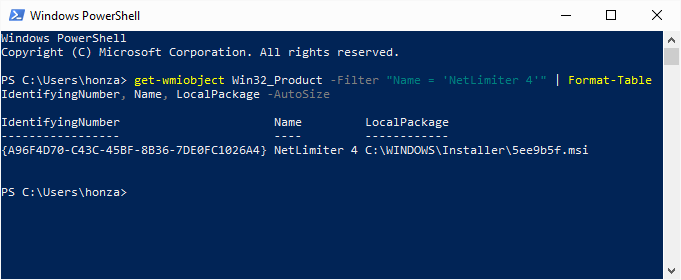
Start PowerShell console (press WinKey+R, type powershell and press Enter) and execute following command:
get-wmiobject Win32_Product -Filter "Name = 'NetLimiter 4'" | Format-Table IdentifyingNumber, Name, LocalPackage -AutoSize
You will get a table where IdentifyingNumber is the requested product id. (LocalPackage shows location of installation package)
Registry search
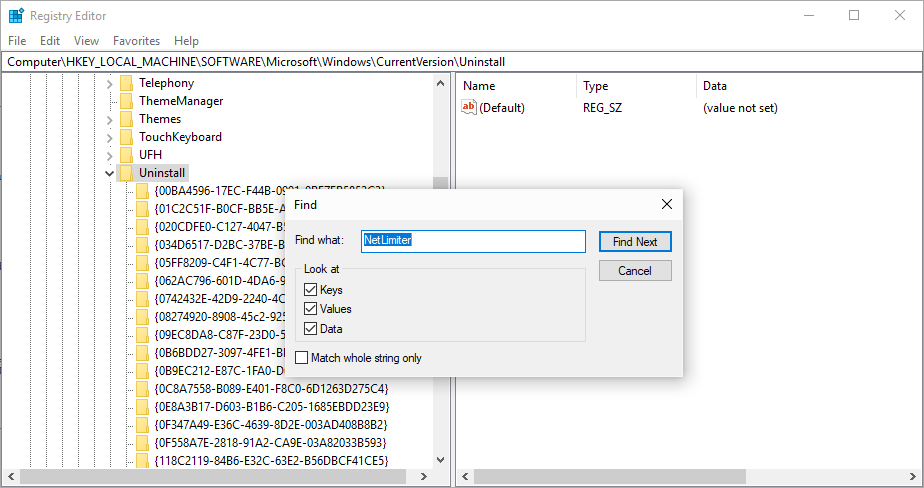
- Start Regitry Editor console (press
WinKey+R, typeregeditand pressEnter) - Browse to the key
HKEY_LOCAL_MACHINE\SOFTWARE\Microsoft\Windows\CurrentVersion\Uninstall. - Click on the key with right mouse button and select
Find.... - Enter NetLimiter into a
Find what:text box and pressFind nextbutton. - You will be redirected to a nearest key which contains searched string (NetLimiter).
- The name of the key is the requested NetLimiter product id.