 NetLimiter
FAQ
FAQs
Frequently asked questions.
NetLimiter 4 license is not working in version 5
All NetLimiter 4 licenses can be used in NetLimiter 5 for two years from the purchase date. For example: If your NetLimiter 4 license was purchased exactly 6 months ago, you can use your version 4 code to unlock version 5 and use it for 18 months. After this period expires, you can revert back to using NetLimiter 4 version (and use it until the end of days) or renew/purchase version 5 subscription period.
The life-time usage is only for NetLimiter version 4 (4.1.14 is the latest release). NetLimiter version 5 is based on time-limited subscription model (1 or 2 years).
How to limit whole computer, but exclude one (or more) application(s)?
Create a Filter with a Function named Application path is not and add path to apps which should be excluded as Values. More about Filters can be found here.
Then, for this Filter, you can create a Rule which could be a limit, a blocking rule, a quota or a priority.
How to prevent certain application from displaying in Activity tab?
Hide it! Click on the app with right-mouse button and select Move to Hidden. It will then appear on Hidden sub-tab.
How do I reset Totals in Activity View?
There is a Red curved arrow in right top corner of Activity view which resets the Totals.
How do I move my registered version of NetLimiter to a new machine?
Just uninstall NetLimiter from old machine, install it to new one and use your “old” registration data again.
What is the difference between limit and priority?
Limits allow you to precisely control network bandwidth of single connection or of whole application, but in some cases it could be too restrictive. Priorities are more gentle way how to control the bandwidth. If one application has higher priority than other, NetLimiter will prioritize its traffic over the other's traffic. This will allow it to run at its full potential (speed), but it will not restrict the application with lower priority as much as limit would.
Why is the upgrade page not working?
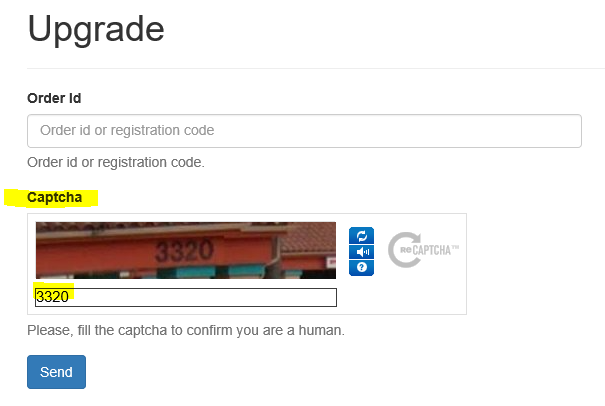
We use the well known ReCaptcha tool on the upgrade page. Some browsers or browser plugins can remove the ReCaptcha field and make the upgrade page unusable. Please be sure the captcha field is shown correctly. If you are affected by this issue, check your browser settings please. You also can try to load the page in another browser. Properly loaded upgrade page should look as follows:
How can I use Netlimiter to regulate bandwidth on another computer on my wireless network?
Just install NetLimiter 4 to the other machine and control it remotely from you computer. More info about Remote connection can be found here.
Setting units in Client application does not work. Activity column values are not affected by it.
If the units displayed in Activity view's columns are not same as Default units then they are probably set to Auto Units (current setting is displayed in column's header). To change their units settings just click on the column's header with right-mouse button and select preferred value for the column.
What is the difference between Enterprise and Site licenses?
Both of these licenses can be used to register unlimited number of computers. Site license is limited to one owner's (company's) building or site. Enterprise license does not have this restriction and can be used at multiple locations simultaneously. Please, read this for more info.
I would like to upgrade from NetLimiter 3 to NetLimiter 4, but my old license key does not work with the new version.
You need a specific NetLimiter 4 key in order to unlock the program. Please, check our upgrade page whether you could get any discounts with your old NetLimiter 3 key.
I updated from Windows 7 to Windows 10 and my installation of NetLimiter 3 is corrupted. I can't remove it or install NetLimiter 4.
NetLimiter 3 and its installator is not compatible with Windows 10. If you updated from Windows 7 or 8.1 to Windows 10 with NetLimiter 3 installed then you got into quite peculiar situation. You need to get rid off it manually, because installator does not work under Windows 10.
Please, follow next few steps:
-
Run command
msizap TW! {913923AB-3AAB-4870-8910-627C4CD82789}from your command line with administrative privileges. Msizap is an installation cleaning tool. You can get it as a part of Windows SDK or unofficially (and more easily) from our server. -
Manually delete following registry keys (using Windows registry editor -
regedit.exe) if they were not cleaned by Msizap:HKEY_LOCAL_MACHINE\SYSTEM\CurrentControlSet\Enum\Root\NLNDISMP,HKEY_LOCAL_MACHINE\SYSTEM\CurrentControlSet\services\NLNdisMP,HKEY_LOCAL_MACHINE\SYSTEM\CurrentControlSet\services\NLNdisPT,HKEY_LOCAL_MACHINE\SYSTEM\CurrentControlSet\services\nlsvc,HKEY_LOCAL_MACHINE\SYSTEM\CurrentControlSet\services\nltdi,HKEY_CURRENT_USER\Software\Locktime\NetLimiter\3,HKEY_CURRENT_USER\Software\Microsoft\NetLimiter 3,HKEY_LOCAL_MACHINE\SOFTWARE\Locktime\NetLimiter\3,HKEY_LOCAL_MACHINE\SOFTWARE\Locktime Software\NetLimiter 3,HKEY_CLASSES_ROOT\Installer\Products\BA329319BAA30784980126C7C48D7298. For your convenience, we put the keys into this registry file. Download it, execute it and it will remove all the registry keys for you. -
Delete remaining content of NetLimiter 3 installation directory (usually in
C:\Program Files\NetLimiter 3). -
Restart your computer.
On system start i always receive error "There was no endpoint listening at net.pipe://127.0.0.1/NetLimiterPipe0..."
The culprit of this message is that NetLimiter 4 Service was not started during system start. You can press the Start button to start it, but if you want to get rid off this problem, then you need to investigate it.
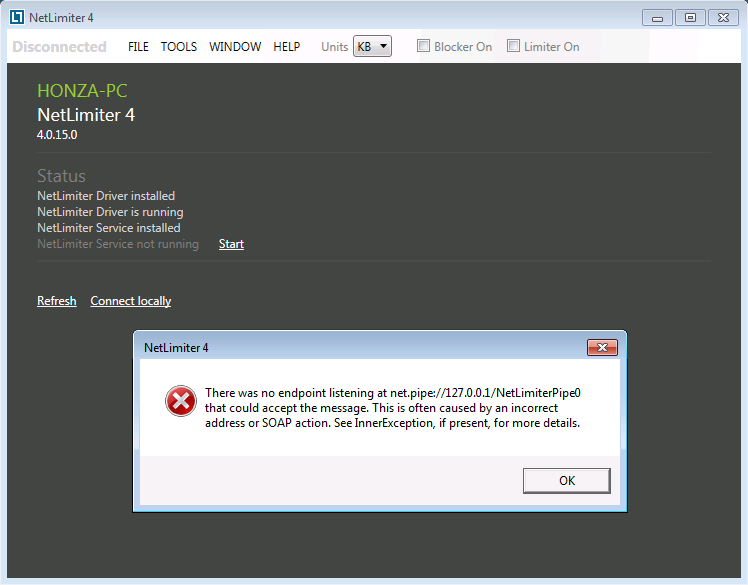
Very rarely this is caused by NetLimiter 4 itself, but mostly there is something else behind it. To know more, please open Control Panel\System and Security\Administrative Tools\Services\NetLimiter 4 Service and check if its Start value is set to Automatic. If it is, then please contact us about it, because there could be some problem with NetLimiter 4.
If it is set to Manual or Disabled, then other software running on your system is the culprit - it changed it to other value then Automatic. Some incompetent so-called system start accelerators do such things and you have to set them to allow NetLimiter 4 Service to start automatically during system start. In particular, we have discovered such strange behaviour with free software called 360 Total Security.
How to copy settings (Rules, Filters, etc.) from one computer to another?
All Rules, Filters and other NetLimiter entities are saved in a single settings file. Just stop NetLimiter Service on the destination machine, copy the XML file and start the Service again.
If you would like to move the Stats database, copy all of its files as you'd do with the settings file.
How to clear uninstalled applications from Application list?
Go to Application list, select all apps using shortcut Ctrl+A, press Right mouse button to open context menu and select Delete apps. It will not remove all selected apps, but only those which don't physically exist on the disk.
Installation of NetLimiter 4 on Windows 7 fails with messsage "Windows requires a digitally signed driver". How can i get over it?
Since version 4.0.20.0 we switched to SHA-2 algorithm for digital signature of our kernel driver. If you receive this message in Windows 7, then your system is probably not properly updated. Specifically, you need this Windows update to make SHA-2 signatures work.
The other option is to disable driver signature enforcement, which we don’t recommend. It is also possible to use version 4.0.19.0 or any older release.
Note: On some systems you will be able to install NetLimiter 4, but the driver will not start after system restart and you will receive an error: There was no endpoint listening at net.pipe://127.0.0.1/NetLimiterPipe0 that could....
NetLimiter crashes or cannot start after Windows 10 Creators update.
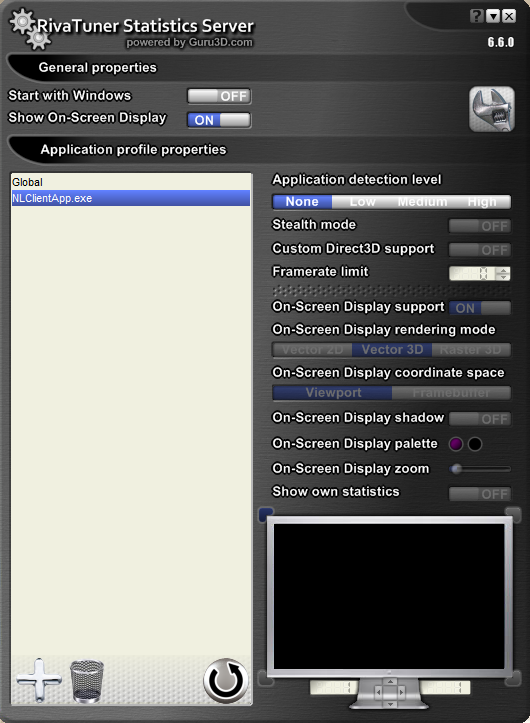
This problem is most probably caused by application named Riva Tuner Statistics Server. Please, follow these steps to get rid off it:
- Open Riva Tuner SS.
- Add NetLimiter profile by clicking on big plus sign in lower left corner, browsing to NetLimiter installation directory (by default at C:\Program Files\Locktime Software\NetLimiter 4) and selecting NLClientApp.exe.
- Select NetLimiter profile and choose None in Application detection level menu.
- Check if NetLimiter can start.
How the get a product id of currently installed version
There are 2 recommended ways...
Windows PowerShell
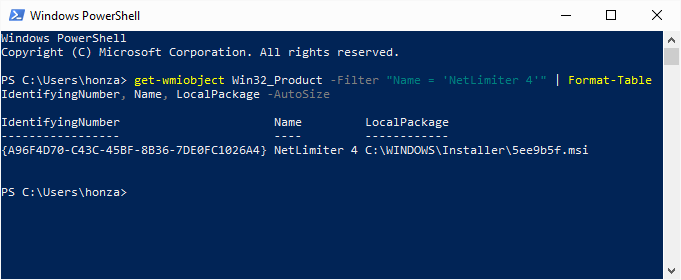
Start PowerShell console (press WinKey+R, type powershell and press Enter) and execute following command:
get-wmiobject Win32_Product -Filter "Name = 'NetLimiter 4'" | Format-Table IdentifyingNumber, Name, LocalPackage -AutoSize
You will get a table where IdentifyingNumber is the requested product id. (LocalPackage shows location of installation package)
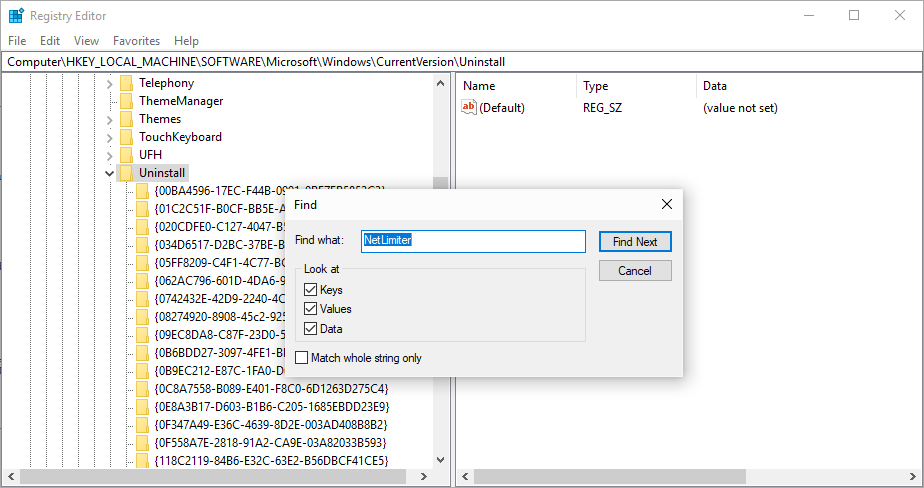
Registry search
- Start Regitry Editor console (press
WinKey+R, typeregeditand pressEnter) - Browse to the key
HKEY_LOCAL_MACHINE\SOFTWARE\Microsoft\Windows\CurrentVersion\Uninstall. - Click on the key with right mouse button and select
Find.... - Enter NetLimiter into a
Find what:text box and pressFind nextbutton. - You will be redirected to a nearest key which contains searched string (NetLimiter).
- The name of the key is the requested NetLimiter product id.
Didn’t find your answer?
Browse the documentation or contact our support.